# Lumina Signals (Beta)

Lumina Signals is a daily feed of decision-ready security risk signals, surfacing what Sola's autonomous intelligence layer detected and prioritized across your connected data sources.

**Each day**, Sola analyzes your entire environment and surfaces what matters most right now. **Every signal has already been investigated before it reaches you**, arriving with context, reasoning, and recommended actions pre-assembled, ready for your team to act on.

<figure><img src="/files/H27XJq6IzZ0QvjHyQVaU" alt="Lumina Signals"><figcaption><p>From data sources to prioritized insights, inside Sola's intelligence layer</p></figcaption></figure>

Sola understands every resource and the connections between them, identifying deviations and risk patterns, and grouping related assets into signals. Each signal represents a compression of thousands of data points into a **focused set of meaningful risk clusters**, scored and prioritized based on what each asset means to your organization.

The most critical signals are surfaced in your daily feed. **This is a live feed that changes with your environment, not an alert queue**. There are no open or closed states. If a risk is resolved, it disappears. If it persists, it reappears.

Lumina signals operate at the workspace level, giving you a unified view across all your connected data sources.

{% hint style="info" %}
Lumina Signals is [available on paid plans](https://sola.security/pricing/).
{% endhint %}

{% embed url="<https://sola.security/pricing/>" %}

### **What makes Lumina Signals different**

* Intelligent grouping: thousands of findings compressed into meaningful risk clusters
* Cross-domain: all connected sources analyzed as one unified environment
* Business context: risk scoring specific to your organization, not a generic average
* Always fresh: daily analysis, live feed, reflects your environment right now
* Pre-investigated: every signal arrives with context, reasoning, blast radius, and recommended actions already assembled

## Navigating Lumina Signals

Lumina Signals includes three main views:

1. **Overview** - A visualization of your environment and the risks Sola detected, from connected data sources through risk reasoning and pattern grouping to AI-contextualized clusters, with a full severity breakdown.
2. **Matrix View** - A Risk vs. Anomaly scatter plot for visual prioritization across your insights.
3. **Signal List** - A ranked list of the top signals surfaced for your environment.

<div><figure><img src="/files/H27XJq6IzZ0QvjHyQVaU" alt="Lumina Signals - Overview"><figcaption><p>Overview</p></figcaption></figure> <figure><img src="/files/VqQxqrOkqlv0poPBKIx2" alt="Lumina Signals - Matrix View"><figcaption><p>Matrix View</p></figcaption></figure> <figure><img src="/files/HoYXUZJge3Vffx6spT3c" alt="Lumina Signals - Signal List"><figcaption><p>Signal List</p></figcaption></figure></div>

## How Lumina Signals works

Lumina Signals is powered by Sola's intelligence layer, a combination of AI reasoning, graph analysis, and security domain expertise that processes signals across all your connected data sources.

Each day, Sola runs the following process:

{% stepper %}
{% step %}

### Collects and unifies signals

Ingests data from all connected sources of your assets, identities, and relationships to create a single unified view.
{% endstep %}

{% step %}

### Maps your environment as a relational graph

Understands how resources interact, exposing dependencies, access paths, and potential blast radius.
{% endstep %}

{% step %}

### Identifies and evaluates risk signals

Analyzes risks across different security domains (misconfigurations, anomalies, attack paths, toxic combinations) in full context, not in isolation.
{% endstep %}

{% step %}

### Applies contextual reasoning and clustering

Groups related assets into meaningful risk patterns using environment, usage, and context.
{% endstep %}

{% step %}

### Surfaces what actually requires attention most

Outputs the top, focused, high-confidence signals, centrally ranked across all connected domains by impact and urgency. The most critical risks always rise to the top.
{% endstep %}
{% endstepper %}

![](/files/u9RHZRvhr64TfNP6IjXP) **The result: A curated, prioritized feed of the most critical signals across your entire environment, in one unified view.**

{% embed url="<https://sola.security/insights/ai-native-asset-intelligence/>" %}

## Context

Sola uses **business context** to understand your environment.&#x20;

Business context is a set of AI-inferred labels describing each asset's role, environment, and exposure profile. These labels are a key part of what makes risk scoring specific to your organization, rather than a generic industry average.

Context adjusts severity scoring in both directions. A finding can be amplified (for example, from High to Critical if the asset is production-critical) or downgraded (for example, from Critical to High if it applies to a non-production environment). When context changes a finding's severity, the signal shows both the original and adjusted score.

### Business context

**Business context labels** are inferred automatically from asset configurations, tags, names, and relationships, factoring in business function, data sensitivity, environment classification, and blast radius. They reflect what each asset actually is, how critical it is to the business, and how far a compromise could spread.

Labels are displayed in `Category: Value` format, for example:

* `Environment: Production`
* `Control Role: Orchestrator`
* `Data Type: Regulated / Sensitive`
* `Blast Radius Category: Identity Control Plane`

Click any label on a signal to see the AI reasoning behind it, including why it was assigned and how many assets it applies to.

### Adding business context

Sola infers business context automatically, but you can add context it cannot learn on its own, such as naming conventions, environment classifications, or asset priorities specific to your organization. When you add context in plain language, Sola maps it to the same business context labels and applies it across your environment, adjusting severity scoring for the affected signals.

{% hint style="info" %}
**When change apply**

Context takes effect from the next daily analysis. Changes you add today will be reflected tomorrow.
{% endhint %}

Click **Add context** to open the Context window.

Each entry includes:

<table data-header-hidden><thead><tr><th width="168.5225830078125"></th><th></th></tr></thead><tbody><tr><td><strong>Description</strong></td><td>The plain-language input describing this context rule, as entered by the user.</td></tr><tr><td><strong>AI Description</strong></td><td>The context rule as Sola interpreted and applied it.</td></tr><tr><td><strong>Category</strong></td><td>The type of business context defined, such as environment type, resource role, or data type. For example: Environment, Functional Role, Control Role.</td></tr><tr><td><strong>Impact / Value</strong></td><td>The value assigned to the selected category and how it affects risk scoring across your assets. For example: Production, Core Business Function, Orchestrator.</td></tr><tr><td><strong>Applies to</strong></td><td>Where this context applies: all resource types (Global) or a specific type, such as aws_s3_bucket.</td></tr><tr><td><strong>Affected Signals</strong></td><td>The signals affected by this context rule.</td></tr><tr><td><strong>Context type</strong></td><td>The category of context this rule belongs to.</td></tr><tr><td><strong>Created by</strong></td><td>Who added the context entry.</td></tr></tbody></table>

## Reviewing the signal list

The Signal List displays your top signals ranked by risk score, available in card view or table view.

Each signal card highlights the most important details you need at a glance, including the **Sola Risk Score**, **signal title**, **connected data sources**, **number of assets** and **findings**, and when the signal was **last calculated**.

### Exploring a signal

Click any signal to open a detailed breakdown across five tabs: [**Overview**](#id-1.-overview), [**Business context**](#business-context), [**Assets**](#id-3.-assets), [**Findings**](#id-4.-findings), and [**Graph view**](#id-5.-graph-view).

Every signal panel shows the Name, Sola Risk Score, and Labels at the top, visible across all tabs. The Sola Risk Score is a 0–10 score where the color indicates severity level: Critical, High, Medium, Low, or Info.

### 1. Overview

The Overview tab gives you a full overview of the detected risk, the assets involved, and the recommended steps to address it.

<div><figure><img src="/files/3WcAhDqrJDqJoA67JCS7" alt="Lumina - Signal list sidepanel - overview"><figcaption></figcaption></figure> <figure><img src="/files/irs1XETLSpPRdvlyXQa3" alt="Lumina - Signal list sidepanel - overview"><figcaption></figcaption></figure></div>

<table data-header-hidden><thead><tr><th width="253.3011474609375"></th><th></th></tr></thead><tbody><tr><td><strong>Summary</strong></td><td>A description of what was detected and why it matters.</td></tr><tr><td><strong>Integrations</strong></td><td>The connected data sources associated with the signal.</td></tr><tr><td><strong>Asset type</strong></td><td>The type of resource from your connected data sources at the center of this signal, such as a user, role, or cloud resource.</td></tr><tr><td><strong>Configuration anomaly</strong></td><td>How statistically unusual the asset's configuration is compared to similar assets: Baseline, Moderate, Strong, or Extreme.</td></tr><tr><td><strong>Business context</strong></td><td>AI-inferred labels describing the role, environment, and exposure profile of the assets involved. Click any chip to see the full detail in the Business Context tab.</td></tr><tr><td><strong>Recommended Remediations</strong></td><td>Recommended steps to address the risk, listed in order of priority.</td></tr></tbody></table>

### 2. Business context

The Business Context tab shows the labels assigned to assets in this signal and the reasoning behind each one.

<div><figure><img src="/files/SCycJd1jvhFJAIX9nZ3i" alt="Lumina - Signal list sidepanel - Business context"><figcaption></figcaption></figure> <figure><img src="/files/3i7MaZHIOz5ddE4utniR" alt="Lumina - Signal list sidepanel - Business context"><figcaption></figcaption></figure></div>

Labels are displayed as chips in the format Category: Value, for example:\
Control Role: Orchestrator or Environment: Development.

Click any label to see the AI reasoning behind it, including why it was assigned and the number of assets it applies to.

To refine business context with your own organizational knowledge, click [**Add context**](#adding-business-context) from the main Lumina Signals page.

### 3. Assets

The Assets tab shows all assets associated with this signal.

Expand any asset to see its properties. Business context chips are shown inline for each asset. Properties vary by asset type. Use search and filter to narrow down the list.

<div><figure><img src="/files/p7zgRg1SYPfT3Ah5Q8oL" alt="Lumina - Signal list sidepanel - Assets"><figcaption></figcaption></figure> <figure><img src="/files/t9H4IDeohJrC2aucB8sP" alt="Lumina - Signal list sidepanel - Assets"><figcaption></figcaption></figure></div>

### 4. Findings

The Findings tab lists all security findings that contributed to this signal.

Each finding shows the name and severity. Expand any finding to see the full description and risk information.

<div><figure><img src="/files/hO9vwkflI5zXgEfkv6xw" alt="Lumina - Signal list sidepanel - Findings"><figcaption></figcaption></figure> <figure><img src="/files/NRrCu9doDNJSTlg30qND" alt="Lumina - Signal list sidepanel - Findings"><figcaption></figcaption></figure></div>

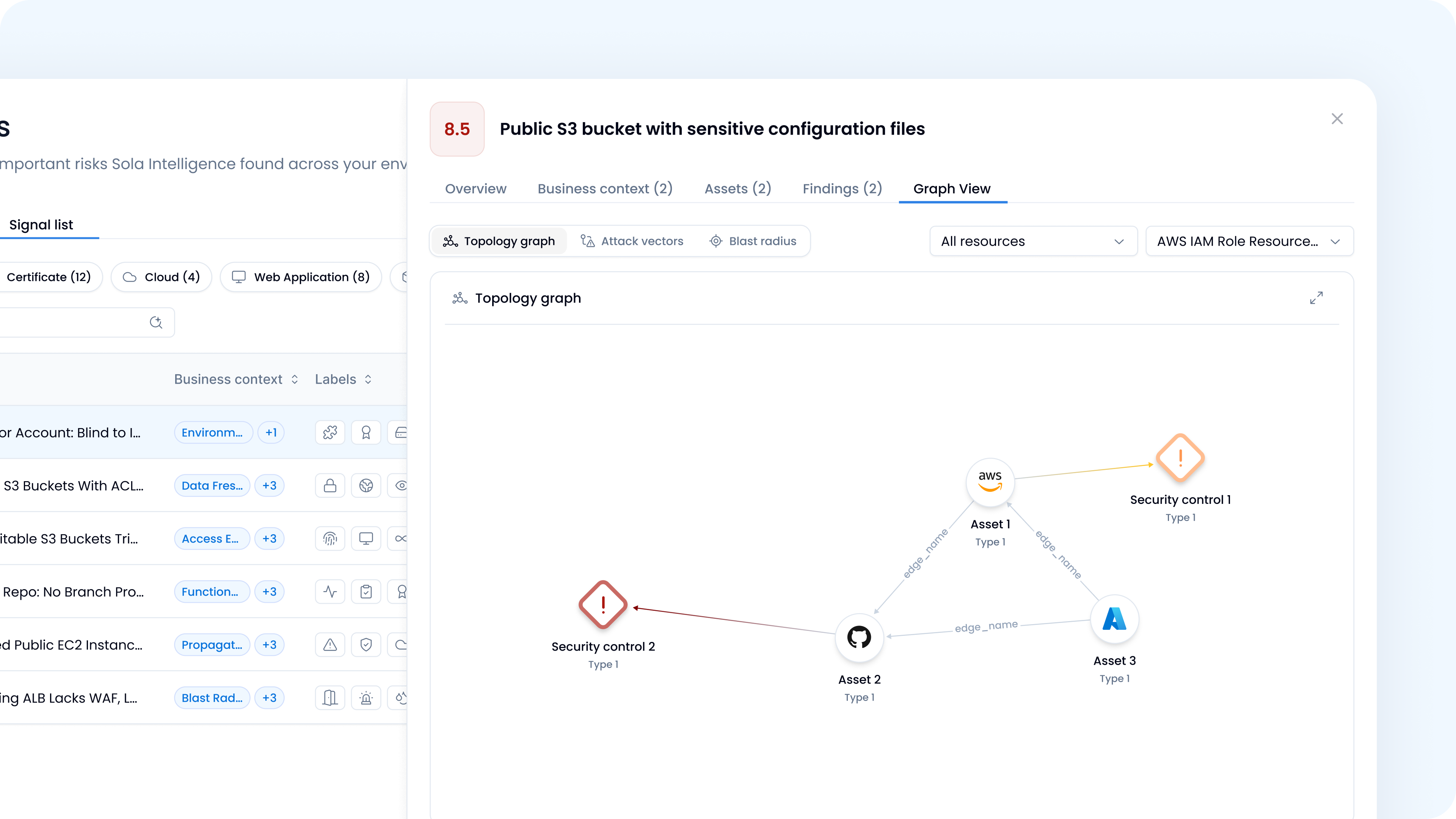
### 5. Graph view

The Graph View tab shows a visual map of the assets involved and how they relate to each other. It can be expanded to fullscreen.

* **Evidence**: A visual map of the asset and its relationships.
* **Attack vectors**: How the risk could be exploited.
* **Blast radius**: The potential scope of impact if the risk is exploited.

<figure><img src="/files/5196ToBTyS6WGCtdTuoU" alt="Lumina - Graph View"><figcaption></figcaption></figure>

## Acting on insights

Once you've reviewed an insight, there are several ways to act on it.

### Recommended Remediations

Each insight includes a prioritized list of recommended steps to address the risk. Review them in the Summary tab and assign or action them as needed.

### Save as a query or configure as an alert

From the Findings tab, review the findings that contributed to an insight to understand the underlying risk in detail. From there, save any finding as a query to use in a canvas or workflow, or configure it as an alert to monitor it going forward.

***

## FAQs

### How can I get Lumina Signals?

Lumina Signals is available on paid plans. [Contact Sola to learn more](https://sola.security/pricing/).

### How does Lumina Signals work?

Lumina Signals is powered by Sola's intelligence layer, which processes signals across all your connected data sources daily. For a full breakdown of the process, see [How Lumina Signals works](#how-lumina-signals-works).

### Who can access Lumina Signals?

Lumina Signals is available to workspace Admins and Owners. At least one data source must be connected to your workspace to generate insights.

### What data sources does Lumina Signals support?

Lumina Signals works with any data source connected to your Sola workspace.

Support for third-party security tools is currently not yet part of Lumina Signals. We're working on expanding coverage to include them.

### How often is my feed refreshed?&#x20;

Lumina Signals generates a fresh set of signals every day. Each daily feed reflects the latest analysis of your environment based on your connected data sources.

### Why don't I see the same insights every day?

Lumina Signals is a live feed, not an alert queue. Each day's view reflects a fresh analysis of your environment. If a risk is resolved, it disappears. If it persists, it reappears.

### Can I customize how signals are scored?&#x20;

Yes, click Add context to provide organizational knowledge, such as environment type, resource role, or data type, that influences how risks are scored and prioritized.

### What is Sola's intelligence layer?&#x20;

Sola's intelligence layer is the engine that powers Lumina Signals.

It combines AI reasoning, graph analysis, and security domain expertise to process signals across all your connected data sources, map relationships between assets, and reason across your entire environment to surface high-confidence, prioritized signals.


---

# Agent Instructions: Querying This Documentation

If you need additional information that is not directly available in this page, you can query the documentation dynamically by asking a question.

Perform an HTTP GET request on the current page URL with the `ask` query parameter:

```
GET https://docs.sola.security/workspace/lumina-signals.md?ask=<question>
```

The question should be specific, self-contained, and written in natural language.
The response will contain a direct answer to the question and relevant excerpts and sources from the documentation.

Use this mechanism when the answer is not explicitly present in the current page, you need clarification or additional context, or you want to retrieve related documentation sections.